Checked against Anthropic’s help centre on 23 November 2026, and every prompt tested on Claude Opus 5.5 the same day. Claude changes quickly, so I re-check this guide every three months, and the Briefing says when it changes. Anthropic has not paid for, reviewed or approved it.
To run a comms team’s core work in Claude, set it up once and then work job by job.
- Make one Project for the team’s comms work and put your rules in it: who you are, how you sound, what you never say, and who signs off.
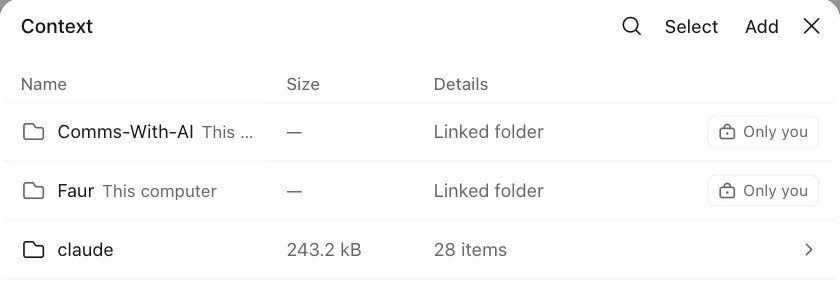
- Add the documents Claude should work from: your position register, key messages, house style and a few examples of finished work you’re proud of.
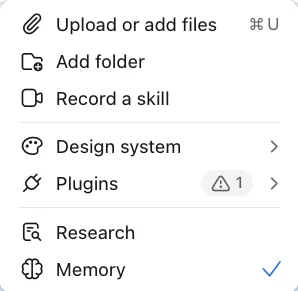
- Switch on only what each job needs: web search for the media brief, a connector for your email or drive, a skill for a check you run every week.
- Run one job from the chapters below, check every line, and keep the prompt that worked.
- Agree what a person always checks before anything leaves the team. Chapter 11 lists those checks.
Read the transcript
If you work in a comms team and you've been handed Claude, or you're about to be, this is the guide I wish somebody had given me before I spent the past year working it all out the hard way. I use Claude most days: drafting, checking facts, turning a week's coverage into something a leader will actually read, and building a good chunk of this site, which you're probably reading this on now, through Claude Code. The biggest difference I've had from Claude recently came from one very boring step: writing our rules down once, in a project, so I stopped explaining who we are every time I opened a chat. Every prompt on this page has been tested and dated, so please take them, use them, and let me know where they fall over. Feedback is invaluable for us.
Each chapter gives what Claude is good for in that job, one copy-ready prompt, a short example, the mistake teams make most often, and the library template to use with it. The chapters follow the Comms With AI 5-phase framework, how a communications team puts AI to work, from planning through to lasting capability. The worked examples in chapters 1, 2 and 4 are real runs in a Claude Project with web search on; the rest use a fictional water company, Northvale Water.
1. Setting Claude up for a comms team
Phase: Govern
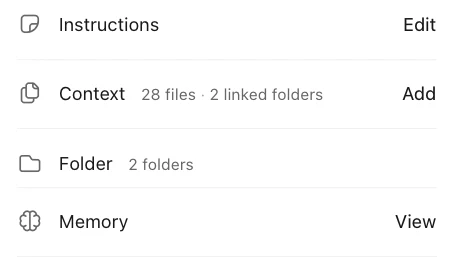
A Project with your rules and documents in it does more for quality than any single prompt. Set it up once, on the plan your organisation licenses, and every chat in it starts from what your team knows.
The six parts, as Anthropic documents them on 23 November 2026:
| Part | What it does for a comms team | Where it runs |
|---|---|---|
| Projects | A workspace with its own instructions and documents. Chats inside it draw on both | Every plan; Free allows five Projects. Sharing with colleagues (can view or can edit) is on Team and Enterprise |
| Instructions | Standing rules: voice, red lines, sign-off, what to do when unsure | Set per Project |
| Foundations (Project knowledge) | Position register, key messages, house style, good past work | Every plan; paid plans expand capacity as the documents grow |
| Memory | Claude remembers what comes up in chats. Each Project keeps its own memory | On by default on individual plans; on Team and Enterprise, the organisation’s owners decide whether it is available |
| Skills | A reusable method for one task, such as a check against your position register. See the skills guide | Every plan; needs code execution switched on. Team and Enterprise owners can give a skill to everyone |
| Connectors | Let Claude read from (and sometimes act in) your email, drive or other tools | Available to all users; Free allows one custom connector. Team and Enterprise owners switch each on and can set actions to allowed, needs approval or blocked |
Read the transcript
Here's roughly what's in my own set-up, and I say roughly because it changes extremely often. The instructions hold the dull rules that matter: UK English, no em dashes or AI giveaways, no hype words, who we are and who we're for, and a short list of things it must never do, starting with naming a client without permission. Then there's a rule I added after things went wrong: anything it can't back up gets marked for checking, so the gaps stay very clear, in square brackets, where I can see them before anyone else does. And some things should never go in at all: client material that hasn't been cleared, anything personal, anything I wouldn't want read out at a board meeting. So write your rules down once. It's the dullest 20 minutes you may spend this month, but it will also be the most useful.
Governance basics, before anyone pastes in real material:
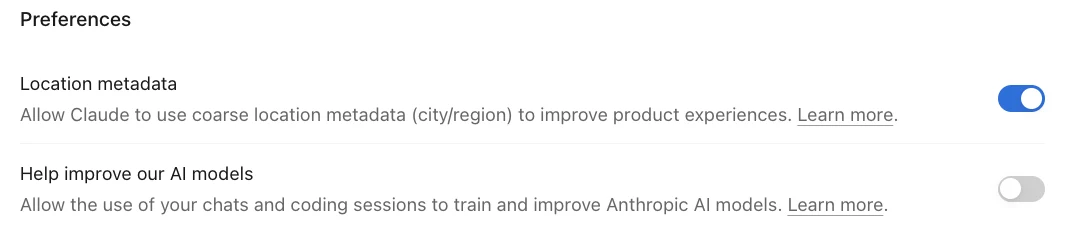
- Use the plan your organisation licenses. On Anthropic’s commercial products (Team, Enterprise and the API), your chats are not used to train models by default. On the individual plans (Free, Pro and Max), they may be, unless you switch model training off in your privacy settings.
- Incognito chats are on every plan and are not saved to your history. They are no substitute for an approved plan.
- Write down what never goes in. Using AI safely sets out the rules; the AI Use Policy template turns them into your own.
- Log the tools and skills you switch on in the AI Tool Register, with an owner and a review date.
The prompt: write your Project instructions
Prompt Tested 23 Nov 2026 on Claude Opus 5.5, in a Project with web search
The house rules for a full draft
Every prompt in this guide works on its own. When you want a draft you could put in front of an approver, add these lines to the end of any of them. They are the rules every prompt in the Comms With AI library ends with.
House rules Add to the end of any prompt
Worked example
We ran this in a Project holding our own position register, house style and two published pieces. The interview took six questions, because Claude proposed answers from those documents and asked only for a yes or a correction. It opened with “Not ready to use”: the rules tell junior team members to phone the editor in an emergency, and nobody had given it a number or a channel, so both came back marked [Confirm]. It also said why it had left the phone number out: instructions are visible to everyone in the Project. Fifteen rules came to 397 words. Two of them, shortened:
- Where the house style and the register disagree, the register decides what we say and the house style how we say it. Reason: removes ambiguity.
- Never take a position on a topic the register marks under review or without a line. Reason: an improvised line becomes our position once published.
It then listed five documents to add instead of describing them, including a social register for each platform and a set of holding lines for comments and messages.
The most common mistake
Writing a persona instead of rules. “You are an award-winning PR director” changes the tone and nothing else. Claude follows rules it can check against: a phrase it must never use, a person who signs off, a figure it must not invent.
Use it with
Comms Foundations Index to decide which documents go in, AI Use Policy, Governed Install Checklist before adding a skill or connector, and the Manage AI Comms workflow. Free on Comms With AI: your Foundations profile holds the same rules for Plan and Message Test.
2. The daily media brief
Phase: Monitor
Claude is good at turning the morning’s coverage into a short brief that says what matters to you and what to do about it. With web search on, it can find recent coverage itself and cite each source. For a full picture it still needs your monitoring tool’s export: web search finds only what is publicly findable.
On a paid plan you can run the same prompt on a schedule, so the brief is waiting each morning. Scheduled tasks are on every paid plan and work with your connectors.
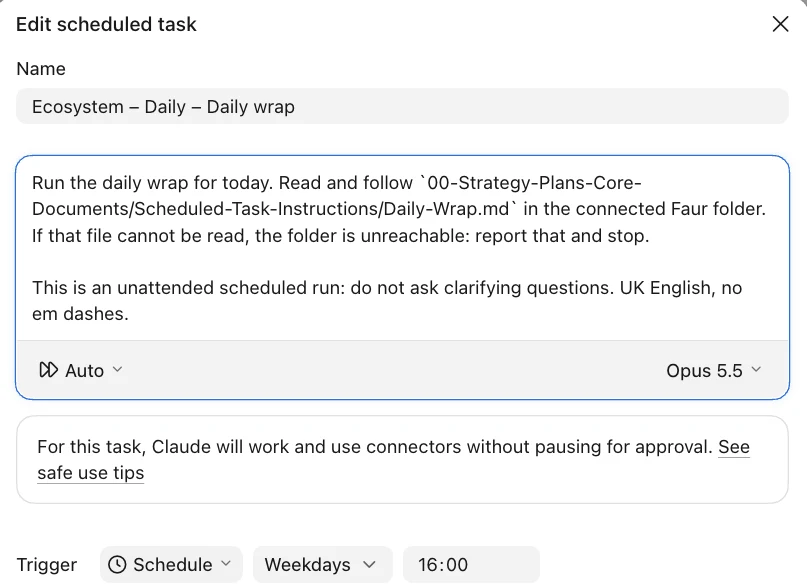
The prompt: the morning brief
Prompt Tested 23 Nov 2026 on Claude Opus 5.5, in a Project with web search
For a full draft, add the house rules to the end.
Worked example
We asked for the brief on a listed UK housebuilder that had issued a profit warning at 7am that morning, with web search on and no register for that company in the Project. Claude said so in its opening line, so every item needing a response came back NO LINE with a role named: the chief financial officer for questions about the lenders, the communications director for a hostile headline. It left reach out because no source gave it, marked one point as its own inference, and asked us to check a key date against the company’s own announcement, which it could not open.
What needed correcting: most of its sources were aggregators and market sites rather than the outlets themselves, one item named after a national business title linked to a different site, and the brief ran to about 340 words against a limit of 300. Open every link before the brief goes to leadership.
The most common mistake
Treating the brief as complete. A brief built from web search alone may miss paywalled print, broadcast and most social. Say on the brief what it was built from, and feed it your monitoring export when the stakes are high.
Use it with
Weekly Monitoring Brief, Issue Log Tracker and Position Register. For monitoring tools, see the media relations tools guide.
The Briefing says when this guide changes. It lands every week: what’s changed in AI, what it means for your work, and one thing to try.
3. Press releases and announcements
Phase: Create
Claude writes a sound first draft of a release from a fact sheet, and it is better still at checking a draft against what you can prove. Give it the facts, the audience and your house style; ask it to list every claim it made and where each came from. That list is what your approver needs.
The prompt: fact sheet to release, with a claims list
Prompt Tested 23 Nov 2026 on Claude Opus 5.5
For a full draft, add the house rules to the end.
Worked example
From a ten-line Northvale Water fact sheet on a new reservoir pipeline, the draft came back at 380 words with a headline about the number of homes covered, a [Confirm: completion date from engineering] in the second paragraph, and a quote marked for approval. The claims table listed nine claims, all sourced to the fact sheet, and caught one phrase (“the region’s largest”) with no source, which it then removed.
The most common mistake
Letting the quote write itself. Claude will produce a fluent quote that sounds like your chief executive and says something they never agreed. Mark every quote for approval and keep it to what the facts support.
Use it with
Press Release Structure, Claims Substantiation Checklist, Executive Quote Pack and the Launch Campaign workflow.
4. Pitching and journalist research
Phase: Strategise
Claude can read a journalist’s recent published work and tell you which of your stories fits it, and why. With web search on, it finds and cites their recent pieces. On paid plans, research runs several searches that build on each other and returns a cited answer in minutes, which suits a longer target list.
Keep it to published work. A journalist’s beat, recent stories and stated interests are fair research; their personal life is not.
The prompt: is this pitch right for this journalist?
Prompt Tested 23 Nov 2026 on Claude Opus 5.5, in a Project with web search
For a full draft, add the house rules to the end.
Worked example
We misspelled the name of a Scottish daily’s business editor on purpose. Claude corrected the spelling, confirmed his role from a post the paper made on 1 October, and said plainly that it was relying on the search result’s text because neither the paper’s site nor the post would open. It then rated our story (this guide, an interview and the prompts) a poor fit: he writes business news and economic commentary, and the story had no Scottish data, no named organisation and no figures. It wrote no pitch, and said what would move the rating to possible.
What needed correcting: with the paper’s own site blocked, several links went to mirror copies and aggregators, and some dates were Claude’s inference, which it flagged. A “poor” with reasons is the prompt doing its job.
The most common mistake
Trusting the role. Journalists move outlets and beats often, and a model’s training data is months out of date. Make Claude confirm the current role from a dated page, or stop.
Use it with
Media Pitch Builder, Stakeholder Mapping Matrix and Story Idea Triage. For journalist databases and pitching tools, see the media relations tools guide.
5. Executive comms and speeches
Phase: Create
Claude can write in a leader’s voice if you give it the leader’s own words to learn from. Keep a Project for each principal you write for, holding transcripts of talks they gave well, posts they wrote themselves and the phrases they avoid. Without those, everything comes back in the same polished register.
The prompt: a speech for the ear
Prompt Tested 23 Nov 2026 on Claude Opus 5.5
For a full draft, add the house rules to the end.
Worked example
Given a two-page transcript of a fictional Northvale Water chief executive and five bullet points for a customer forum, the speech opened on a question to the room, as the transcript did, and left two [Story: …] marks rather than inventing anecdotes. It named one line as likely to be quoted and flagged “we will never let the taps run dry” as a promise the notes did not support.
The most common mistake
Inventing the personal story. A made-up anecdote in a leader’s mouth is the fastest way to lose their trust, and yours. Mark where a story goes; let them supply it.
Use it with
Executive Quote Pack, Executive LinkedIn Ghost-Writing Pack and Town Hall Q&A Preparation. For tools, see the executive communications tools guide.
6. Internal comms
Phase: Create
Claude is strong at turning one announcement into the versions each audience needs: the all-staff note, the manager cascade and the questions people will ask. It is also a useful sceptic: asked to read a draft as a worried employee would, it finds the gaps people will fill with rumour.
Take care with what goes in. Change programmes often involve personal data and unannounced decisions: keep them to an approved plan and out of individual accounts.
The prompt: one change, three versions
Prompt Tested 23 Nov 2026 on Claude Opus 5.5
For a full draft, add the house rules to the end.
Worked example
From a fictional announcement that Northvale Water’s billing team is moving to a new site, Claude produced a 210-word note, five cascade questions with answers, and seven unanswered questions. The unanswered list held the ones that matter most: whether travel time is paid, what happens to part-time patterns, and whether any roles change.
The most common mistake
Answering questions the announcement doesn’t. Claude will fill a gap with something plausible. In internal comms that becomes a promise. The third part of the prompt exists to send those questions back to a person.
Use it with
Manager Cascade Notes, All-Staff Update Format, Change Communications Plan and the Internal Change Communications workflow. For tools, see the internal communications tools guide.
The field guide to AI for internal comms, built with practitioners, is on the way. The Briefing will say when it’s live.
7. Social replies and community
Phase: Create
Claude is useful for sorting a pile of comments and drafting replies from lines you have already approved. It saves the most time on the sorting: which comments need a person, which a standard reply, and which none. A person still posts every reply.
The prompt: triage and draft
Prompt Tested 23 Nov 2026 on Claude Opus 5.5
For a full draft, add the house rules to the end.
Worked example
For 20 fictional comments under a Northvale Water post about planned roadworks, Claude put two in ESCALATE (a customer describing a vulnerable relative without water, and a local reporter asking for a statement), drafted nine replies from the library, marked three NO LINE (all about compensation, which the library didn’t cover) and left six.
The most common mistake
Connecting Claude straight to posting. Drafting is safe to speed up; posting in your organisation’s name is a decision a person makes. Keep the human between the draft and the button.
Use it with
Community Response Library, Moderation Guidelines and Escalation and Social Post Variants. For tools, see the social media tools guide.
8. Crisis preparation and the first hours
Phase: Govern
Claude earns its place in crisis work before the crisis: drafting holding statements for likely scenarios, testing them, and getting them approved in calm conditions. In the first hours it helps most with order: separating what is known from what isn’t, and keeping every update consistent with the last.
Decide in advance which plan and Project you will use in an incident, and who may paste what into it. A crisis is the worst time to make that call.
The prompt: the first hour
Prompt Tested 23 Nov 2026 on Claude Opus 5.5
For a full draft, add the house rules to the end.
Worked example
Given five confirmed facts about a fictional burst main affecting 3,000 Northvale Water homes, and one unconfirmed social media claim about contamination, Claude put the contamination claim in NOT YET KNOWN, kept it out of the 71-word holding statement, and listed “is the water safe to drink?” first among questions NOT YET answerable, with a note that this needs the water quality team before the next update.
The most common mistake
Letting it fill the silence. Under time pressure, a fluent paragraph about cause or scale is tempting and almost always wrong in hour one. Only confirmed facts go out, and a person approves every word.
Use it with
Crisis Response Playbook, Crisis Content Pre-Approval Pack, Security Incident Communications Playbook and the Crisis Preparedness and Response workflow. Read AI in crisis comms, stage by stage (Applied) and the crisis communications tools guide.
The field guide to AI for crisis comms, built with practitioners, is on the way. The Briefing will say when it’s live.
9. Reporting that leadership reads
Phase: Monitor
Claude turns a month of activity into a one-page report built around what changed and what you need from leadership. Give it the numbers and the objectives they serve; ask it to lead with the so-what and to show the sum behind any figure it calculates.
The prompt: the one-page report
Prompt Tested 23 Nov 2026 on Claude Opus 5.5
For a full draft, add the house rules to the end.
Worked example
From a fictional month of Northvale Water figures (coverage, website visits to the drought page, and sign-ups for water-saving kits), the report led with kit sign-ups, up from 1,840 to 2,610, and showed the sum (a 42% rise). It rated the regulator-relations objective “at risk” because no meeting had been held, and asked the executive team for one decision: whether to publish leakage figures monthly.
The most common mistake
Reporting volume. Forty pieces of coverage tells leadership what the team did. Tie every number to an objective so it shows what changed, or move it to the appendix.
Use it with
Monthly Stakeholder Update, Earned Media Report, Insights to Actions and the Comms Reporting and Insights workflow. Read Stephen Waddington on making the case for comms (Applied).
10. What AI says about your organisation
Phase: Monitor
Claude can be one of the assistants you check, and the assistant that checks the answers against your position register. People now ask AI assistants about organisations before they visit the website. What those assistants say is a reputation question, and comms owns it.
Ask the same question with web search off and on. Off shows what the model learned in training; on shows what it finds and cites today, which is the part your content can change.
The prompt: the visibility check
Prompt Tested 23 Nov 2026 on Claude Opus 5.5
For a full draft, add the house rules to the end.
Worked example
Given answers from three assistants to five questions about Northvale Water, Claude found one assistant giving a leakage figure two years out of date, citing a news story rather than the company’s own report. Its top correction was to publish the current figure on a page with a clear date, so search-connected assistants have something current to cite.
The most common mistake
Treating one answer as the answer. The same question can get a different reply each time it’s asked. Ask each question more than once, keep the date, and look for patterns over weeks.
Read the series
The Applied series on AI visibility covers the method in depth: Gullible engines: the free way to check, what a paid tracker showed us, what Bing’s AI reports show and claiming a business in ChatGPT.
11. Where Claude is the wrong tool, and the checks a human must make
Phase: Transform
Claude drafts, sorts and checks. Deciding, approving and speaking for the organisation stay with people. Four kinds of work belong elsewhere or with a person:
- Final figures and legal wording. Anything a regulator, court or auditor will read comes from the source document and the person who owns it, not from a model’s summary of it.
- Material your plan doesn’t cover. Confidential, personal or market-sensitive information stays out of any account your organisation hasn’t approved for it.
- Sending, posting or publishing. Connectors can let Claude act in other tools. Keep the last step, the one that speaks in your organisation’s name, with a person.
- Judgement calls about people. Who to brief first, whether to apologise, how a colleague will take a message: Claude can set out the options; the call is yours.
The checks a person makes before anything leaves the team:
| Check | What to look for |
|---|---|
| Facts and figures | Every number, date and name traced to a source you hold |
| Quotes | Approved by the person quoted, in those words |
| Claims | Nothing goes further than your position register or the evidence |
| Names and roles | Current, spelled right, and the right person |
| Audience | Reads right to the people most affected, not only to the team |
| Confidentiality | Nothing in it that wasn’t cleared to leave |
| The record | One line in your AI use log: what went in, what came out, who checked |
The prompt: the sceptical approver
Prompt Tested 23 Nov 2026 on Claude Opus 5.5
For a full draft, add the house rules to the end.
Worked example
Run on the chapter 3 release with one figure deliberately changed, Claude listed the altered figure first, as unsupported by the fact sheet, and flagged “complete by spring” as a commitment the engineering team had not made. It ended as instructed, without calling the draft ready.
The most common mistake
Treating Claude’s check as the sign-off. A model checking a model’s draft catches a great deal, and it can miss the same thing twice. Its list is where the approver starts.
Use it with
AI Use Review and Risk Log, Claims Substantiation Checklist, Daily AI Use Wrap-Up and the AI Pilot Framework for turning what works into the team’s standard practice.
Read the transcript
Drafts of mine went a long way through with figures about a security incident that didn't match the source, and a very confident description of a feature in a tool that, as it turned out, didn't exist, or at least not in the way it said it did. Claude wrote both with total assurance, and then reassured me that everything was correct. We caught it before it was published, which is good, but that was more down to an impromptu check against another source. So now every draft goes through a claim check before I read a word of it. Every fact is pulled out, every source opened, every claim marked confirmed or not. Then the finished production pack goes past one or two other AI tools, such as ChatGPT or Gemini, with a brief written for that piece, so a different model gets its own go at catching what Claude and I both miss. It takes half an hour at most, generally, and it's earned its keep without a doubt. I hope you find this useful. Let me know what went wrong the first time your team used Claude, and what you changed. You can email me: the link is just below.
Want to talk this through?
If your team wants Claude set up around your own rules, positions and approvals, Consult is a 45-minute working session with a written note, at £300. Deploy sets it up in full, where most teams invest £1,500 to £7,500, and Manage keeps it current. Every engagement is delivered directly by Michael MacLennan, AI Communications Leader of the Year 2026.
Next steps
Put it to work
- Free AI Use Policy The living policy template: what your team may use, for what, and what never goes in. Use the template
- Free Position Register The record of what your organisation has said and will stand behind, ready for Claude to check drafts against. Build your register
- Guide AI agent skills for comms teams What a skill is, where skills run, and how to adopt one safely. Read the guide
- For teams Help for your team Consult, Deploy, Training and Manage: the ways Comms With AI works with in-house comms teams. See the options
Coming next: Copilot, ChatGPT and Gemini, on the same pattern.