Just starting out

Your first steps

Two pieces to read first. The guide is dated and refreshed every few months, so it keeps up as the tools change.

Words you’ll keep hearing

Plain-English meanings for the terms that come up in every conversation about AI. Tap one to open it.

  • Assistant chatbot

    An AI tool you talk to in plain language, such as ChatGPT, Claude, Gemini or Copilot. It answers, drafts and summarises from what you give it.

  • Model large language model, LLM

    The engine underneath an assistant. One assistant can run several models, and your plan often decides which one you get.

  • Prompt

    What you type to the assistant. A good prompt says who the work is for, what you want and what good looks like.

  • Context window

    How much an assistant can hold in mind at once: your documents and the conversation so far. In a very long thread, early details can drop out.

  • Hallucination

    When an assistant states something false with confidence, such as an invented quote, statistic or source. It is why every fact is checked before anything goes out.

    Using AI safely
  • Grounding and citations

    Giving the assistant your own sources to work from, or asking it to show where each claim came from, so you can check it.

  • Reasoning mode thinking mode

    A setting where the assistant works through a problem in steps before it answers. It is slower, and better for planning and analysis than for a quick rewrite.

  • Multimodal

    Able to work with images, audio and files as well as text: reading a chart, say, or transcribing a recording.

  • Agent

    An assistant that takes actions for you over several steps, such as browsing, filling in forms or sending messages. Most comms teams keep a person approving each action.

  • Enterprise tier business plan

    The version of an assistant your organisation licenses, with admin controls and contract terms about your data. The right home for internal or unpublished material.

    Which tool for which task
  • Data processing agreement DPA

    The contract that sets out how a supplier handles any personal data you put into its tool. Your organisation’s enterprise tier should come with one.

  • Training on your data

    Whether a supplier may use what you type to improve its models. Business plans usually say no by default; free consumer versions may say yes unless you switch it off.

  • Projects, custom instructions and skills custom GPTs, Gems

    Ways to give an assistant a standing brief, such as your house style or audience, so you don’t repeat it every time. Each tool has its own name for them.

    Dated: OpenAI retires custom GPTs on 11 December 2026, and Google is replacing Gems with skills in Workspace.

  • AI visibility GEO, generative engine optimisation

    How often, and how accurately, AI assistants mention your organisation when people ask them questions. Generative engine optimisation is the work of improving it.

  • Watermarking and content credentials

    Signals attached to AI-generated text, images, audio or video that show how they were made, so they can be detected later.

    Dated: The EU AI Act has required machine-readable marking of AI-generated content since 2 August 2026, with time to 2 December 2026 for systems already on the market.

  • Deepfake

    An AI-made image, audio clip or video of a real person, place or event that looks genuine.

    Dated: Under the EU AI Act, since 2 August 2026, organisations that publish one must say it is AI-generated.

Dated notes checked 21 October 2026.

See it at work

How AI fits a comms week

Five ordinary days. Pick one to see what you can hand to an assistant, what stays with you, and the template to start from.

04 Monitor

Monday: catch up on coverage

Start from: Weekly Monitoring Brief

Hand to the assistant

Turn the coverage and comments you have gathered into a one-page brief, grouped by theme, with the three items most likely to need a response.

Keep for yourself

Deciding what matters, and whether to respond at all.

Low risk: any AI tool, if it is all public material
01 Strategise

Tuesday: plan a campaign

Start from: Campaign Brief

Hand to the assistant

Shape your notes into a first-draft campaign brief, then ask it to argue back: which audience is missing, which message is weakest.

Keep for yourself

The objective, the budget and the call on what will land.

Medium risk: use your organisation’s enterprise tool
02 Create

Wednesday: draft the posts

Start from: Social Post Variants Template

Hand to the assistant

Write five variants of a social post from facts you supply, in your house style, one for each channel.

Keep for yourself

Checking every fact, name and number before anything is scheduled.

Medium risk: use your organisation’s enterprise tool
03 Govern

Thursday: get it signed off

Start from: Claims Substantiation Checklist

Hand to the assistant

Read the draft against your claims checklist and list every statement that needs evidence behind it.

Keep for yourself

The evidence, the approval and the final word.

Medium risk: use your organisation’s enterprise tool
03 Govern

Friday: a crisis lands at four

Start from: Crisis Response Playbook

Hand to the assistant

If your crisis plan allows it, and only in your approved tool: put the facts you have into a timeline and draft a holding statement from your pre-approved lines, ready for you to edit.

Keep for yourself

Every word that goes out, the timing, and who signs it off. Some of this is better written without AI at all.

High risk: approved tool, agreed in advance, or no AI

Each day sits in one phase of the 5-phase framework, the structure behind the library. See the 5-phase framework

Using AI already

Get a little sharper every Friday

The Comms With AI Briefing: what changed in AI for comms this week, what it means for your team, and one thing worth trying. Written by Michael MacLennan, landing Fridays.

Your first email brings a free one-page AI acceptable use note to take to legal, compliance or your board.

Choosing tools? The guides cover each comms stream, job by job
Read the latest issue, 30 October 2026

All free

Events & live sessions

Online conversations with the people changing how communications teams work with AI. Every session is recorded, and the recording goes to everyone who registers.

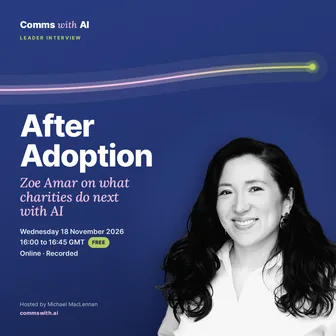
  • Wednesday 18 November 2026

    16:00 to 16:45 GMT · Leader Interview

    After Adoption: Zoe Amar on What Charities Do Next with AI

    • Zoe Amar, Founder and director of Zoe Amar Digital, co-author of the Charity Digital Skills Report and chair of the Charity Digital Code of Practice
    Book your free place Online · Free · Recorded · Booking on Luma
  • Wednesday 9 December 2026

    12:00 to 13:00 GMT · Roundtable

    The year in review

    A panel of three on what actually changed for communications and AI in 2026. Guests will be confirmed in advance of the event.

    Book your free place Online · Free · Recorded · Booking on Luma

Every session, with past write-ups

Want expert guidance?

Help for your team

Advice, set-up, training and ongoing governance for in-house comms teams. Every engagement is delivered directly by Michael MacLennan, AI Communications Leader of the Year (Agency) 2026.