note CreateGovern
A week with Gemini: worth switching on in Gmail, if you check its sources
Gemini earned a daily place in my inbox after a week as my main assistant. Its email summaries need checking against the sources it links, and in the app itself it trailed Claude and ChatGPT.

The Brief
- The result: Gemini now earns its daily place in my inbox (having previously been lacking…). Its AI Overview pulls related emails into one summary with sources, and its suggested drafts now know enough about the people involved that I send more of them as they are. In the Gemini app itself, its answers were notably weaker than Claude’s or ChatGPT’s – it still has a way to go to catch up with these competitors.
- What we did: I made Gemini my main assistant for the week of 2 November, on our Google Workspace Business Standard account, with a pack of Faur and Comms With AI knowledge loaded as a custom skill. This was a week of real use – not a blind test.
- The takeaway: If you run Workspace, switch it on for email, keep your main assistant, and open the sources before you act on any summary.
- Model
- Google Gemini, on the app's Pro setting (the app does not name the model)
- Surface
- Gemini web app; Gemini in Gmail (AI Overview in search, suggested replies and the side panel); Google Workspace Business Standard
- Runs
- Daily use for a working week, with repeat checks in Gmail
- What went in
- A Faur and Comms With AI knowledge pack loaded as a custom skill, my own email, and work drafted in Claude and ChatGPT for a second review
The Story
I searched my inbox for “Synthesia” this morning. Gemini’s AI Overview gave me a tidy summary of six emails: five marketing emails from the vendor, each dated and itemised, and an SEO report from June. It was quicker than opening any of them.
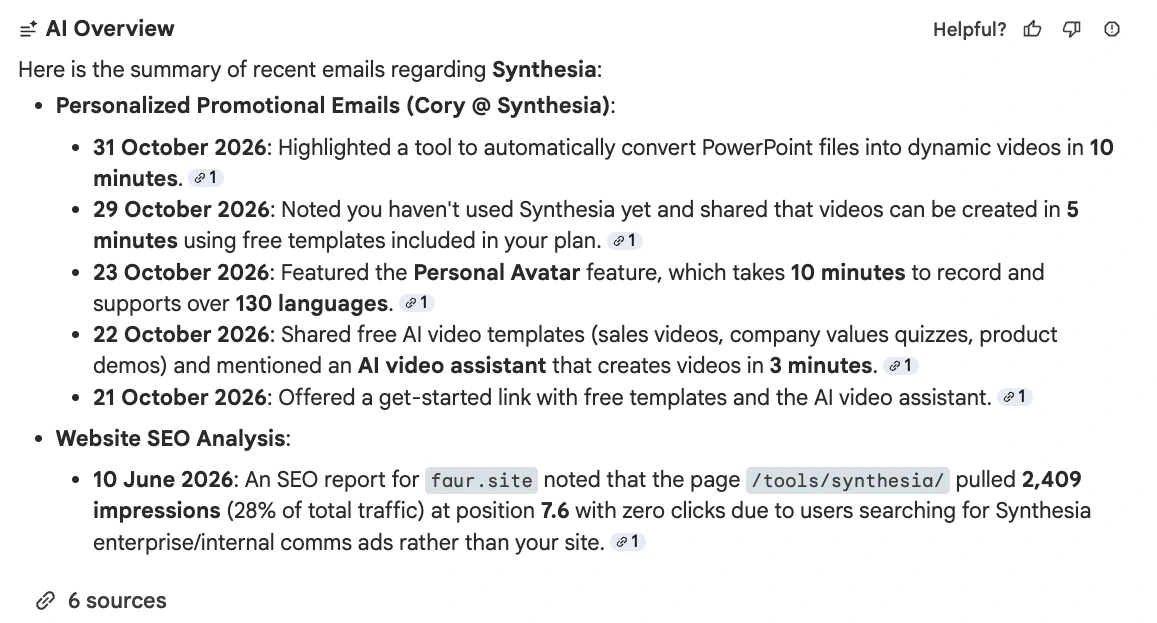
It also got two things wrong. The SEO report was about commswith.ai, where our Synthesia review lives; Gemini attributed it to faur.site, probably because I sent it from my Faur address. And the report said that page took 28% of the site’s search impressions, which Gemini turned into “28% of total traffic”. Neither slip mattered to me. Both would matter in a briefing note to a director, and both are the kind a busy reader passes straight on.
That is the week in miniature: useful, fast, and in need of a check.
What worked
I mostly used Gemini as a second reviewer for work I had done in Claude or ChatGPT, because in the app, on its Pro setting, the answers were weaker. That fits our Comms AI Pentathlon, where Gemini in Workspace finished in the bottom three of eight assistants scored blind. Inside Gmail, I used it more and more each day. The suggested drafts there are much better than a few months ago. They carry more context about the people involved, and I’m now more likely to send one than to take the email into Claude for a draft.
One setup detail was encouraging. Google now calls custom assistants Skills, and says Gems will migrate to them from March 2027. The skill I built from our knowledge pack triggered on its own, without my selecting it.
Where the joins show
I still don’t quite understand how joined up the parts are, which makes for uncertainty – and means that I’m very likely not making best use of Gemini’s capabilities. In one test, the draft Gemini proposed in the side panel differed from the one in Gmail’s compose box, for the same email. I couldn’t tell which context each was using.
Oh, and the connectors are thin! Our account showed seven: Google Workspace and Gemini Notebook installed, plus Asana, HubSpot, Mailchimp, Salesforce and GitHub to add. I use none of the five. Google’s separate Gemini Enterprise product lists far more, but that is not the app most Workspace users open. Claude and ChatGPT reach far more of my tools, including the folders on my laptop, which is why they stay my main assistants.
The account matters too. Google says that where a Workspace licence includes the Gemini app as a core service, chats and uploads are not reviewed by people or used to improve its models; where it is an additional service, they may be. Business Standard was on Google’s core service list, but the app’s “Work • Pro” label doesn’t tell you which applies. Our updated Gemini entry in the tools directory sets out the data terms and the rest of the verdict.
The Practice: what you can put into practice today
- Try AI Overview on one search you would otherwise read through by hand. Then open each source before you use the summary anywhere else.
- Check your licence before anyone uploads client material. In the Admin console, confirm whether the Gemini app is a core service on your Workspace edition.
- Give the suggested drafts a week on one recurring email. Count how many go out with light edits, and how many you still rewrite.
Is Gemini sitting unused in your Workspace, or has it found a job?
Every Applied piece follows the same shape (The Brief, The Story, The Practice) and is made the same way: my argument and examples, drafted with Claude, every claim checked against its source, and a final edit by me. This one: 14 claims checked, two errors in Gemini’s own summary found along the way.
Coming up: the next Comms With AI Leader Interview is After Adoption: Zoe Amar on What Charities Do Next with AI, online on Wednesday 18 November, 16:00 to 16:45 GMT.
A note: one test, one result, dated. Figures checked against the source, product names and versions checked, drafted with Claude, edited by me.
14 claims checked against their sources.
More like this
experimentTransform
The Comms AI Pentathlon 2026: eight AI assistants, five comms briefs, 320 blind scoresOur blind test of eight assistants on comms briefs, where Gemini in Workspace finished in the bottom three.
articleTransform
How to set up project folders in ChatGPT and Claude for comms workWhy folder access matters so much to how I use Claude and ChatGPT.
articleTransform
Tool testing: our review methodologyHow we test the tools in the Comms With AI directory.