experiment GovernTransform
The comms SaaSpocalypse: the SaaS apps Claude has replaced, from CRM to project management, and what it can't (yet)
My CRM, content calendar, project board, media log and analytics now run as Claude-built apps on my desktop, and Notion is cancelled. What moved, what Anthropic's own image editor shows is coming, and the three jobs I kept out.

The Brief
- The result: The CRM, content calendar, project board, media log and analytics I run my business on now sit on my desktop as apps, each with its own icon and window. They are now Claude Artifacts, previously accessible within Claude and via a custom URL. Anthropic added “Install as app” to Claude for Mac and Windows on 24 November, and installing all five took a couple of minutes – all now on my laptop’s dock, though each is still Claude working behind the scenes rather than standalone software.
- What we did: Rebuilt each tool in Claude a month ago (an hour or two each), improved them in use since, cancelled previous tools such as Notion and Monday.com, installed the five as apps the morning after the feature launched, tried Anthropic’s own demo image editor, and took stock of what Claude still can’t take over.
- The takeaway: Your AI can now build and run the tools as well as write the words, and those tools open like any other app. Before you hand one over, ask what you are paying for: the software, the data or the accountability. Only the software moves easily.
- Model
- Claude (Opus 5.5 for the October builds; Fable 5.2 for the 26 November visibility app)
- Surface
- Claude artifacts, installed with Install as app (beta) in Claude for Mac; Claude in Chrome for QuickBooks
- Runs
- Daily use of five apps since October; one seven-minute build on 26 November
- What went in
- My content calendar, CRM, media log, project board and GA4 analytics. Screenshots use a mock-up pipeline with invented clients, and private contacts and readership figures are blurred.
The Story
On Wednesday morning I restarted Claude on my Mac, opened my project board, chose “Install as app” from its menu and watched it appear in its own window with its own icon. It was so quick that I had done the other four – the CRM, the content calendar, the media log and the analytics dashboard – within a couple of minutes, and then sat looking at a desktop that, for the first time, held a software stack I had described rather than bought.
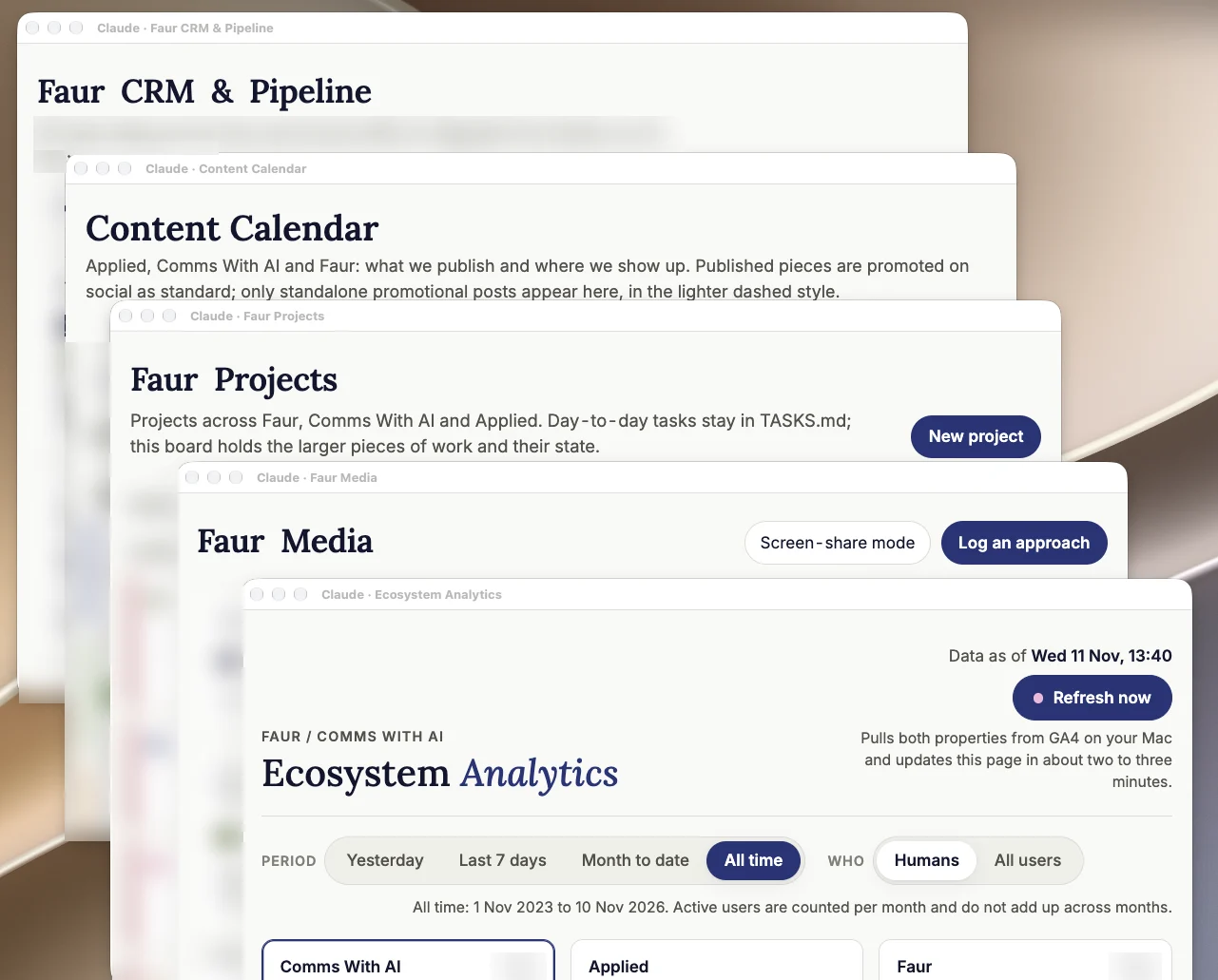
Commentators have spent this year calling what is supposed to happen next the SaaSpocalypse: the fear that AI agents will replace the software businesses pay for, and the share prices of the companies that sell it. (Some observers pinned February’s sell-off on Anthropic’s own Cowork plugins, so Claude is hardly a neutral party here.)
Having watched a fair few analysts announce the death of things that are still very much alive, I have been sceptical. Building small apps with AI is not new either, and other tools have offered it for a while. However, what changed this week is that it now happens inside an assistant a great many people already have open all day – and the result sits on the desktop beside everything else they pay for.
Five apps, a month in the making
None of the five started this week. A month ago, over a few days, I moved everything I used to keep up by hand into Claude Artifacts: small apps Claude builds from a description, each with its own database. The content calendar went first, because the Notion connector was costing more in tokens than the job was worth; then my CRM, which had already been rebuilt in Notion from Monday.com exports in June (but lacked some features I wanted to get in there, such as a customisable dashboard overview); then the media log and the project board. The analytics replaced a pile of GA4 snapshot links I used to open most mornings with a dashboard and a single Refresh button.
Each build took an hour or two to get running. Everything since has been feedback in use – this column is wrong, add a due list or a checkbox, stop showing me the dead leads – which is “just like contacting an IT person”, except this one answers at 6 am.
The aim was never to rebuild Notion feature for feature – it was to go beyond it, for the way I actually work.
The bigger change is who keeps it all up to date. These tools are managed by Claude on my behalf. A meeting summary dictated into Granola lands in the CRM with the next step and its date; an idea recorded on my phone lands in the content calendar; and if something is out of date, one sentence to Claude updates the lot. Then I cancelled Notion and most of my other subscriptions, with the only one left on the list being QuickBooks for financial accounting and reporting. (Adobe Creative Cloud had already gone, and not because of any of this: I was using it less and less, and only really for Lightroom. I’m still desperate for a good Lightroom replacement, and perhaps the person to build it is now me.)
My stack, before and after
Who keeps it up to date?
Five of the six jobs moved into tools Claude built and keeps up to date. The sixth stayed where the accountability is.
| Job | Before | Now |
|---|---|---|
| Content calendar | A Notion databaseKept up by: Me, by hand | A Claude Artifact app. A voice note or one sentence adds or moves a pieceKept up by: Claude |
| CRM and pipeline | Notion, rebuilt from Monday.com exports in JuneKept up by: Me, by hand | An Artifact app with the dashboard Notion lacked. Meeting summaries land with the next step and its dateKept up by: Claude |
| Media log | A Notion databaseKept up by: Me, by hand | An Artifact app with a screen-share mode that hides private contactsKept up by: Claude |
| Project board | A Notion boardKept up by: Me, by hand | An Artifact app with the due list I asked forKept up by: Claude |
| Analytics | GA4 snapshot links, opened most morningsKept up by: Me, by hand | A dashboard with one Refresh buttonKept up by: Claude, on request |
| Accounts | QuickBooksKept up by: Me | Still QuickBooks. Claude helps through Chrome, and I still download documents by handKept up by: Me, with Claude helping |
Then I opened Linnet
To show what the feature can do, Anthropic has published a set of demo apps its own people built: Linnet, a layered image editor; Phosphor, a file manager; Sift, which sorts folders by rules you set; Tern, a terminal with Claude alongside; and Vitals, a performance monitor for the menu bar. They are labelled as demos, “not official Anthropic products”.
I installed Linnet, and it was pretty staggering. Within minutes I had a proper menu bar – File, Edit, Image, Layer, Select, Filter – which my own apps don’t have, along with layers, masks, text, dodge and burn, and a portrait recoloured by sliding a hue control on a masked layer. I am not saying it has the depth of Photoshop yet. But it is an image editor that someone at Anthropic made with Claude’s artifact apps feature, and it installed in the time it takes to make a cup of badly made tea.
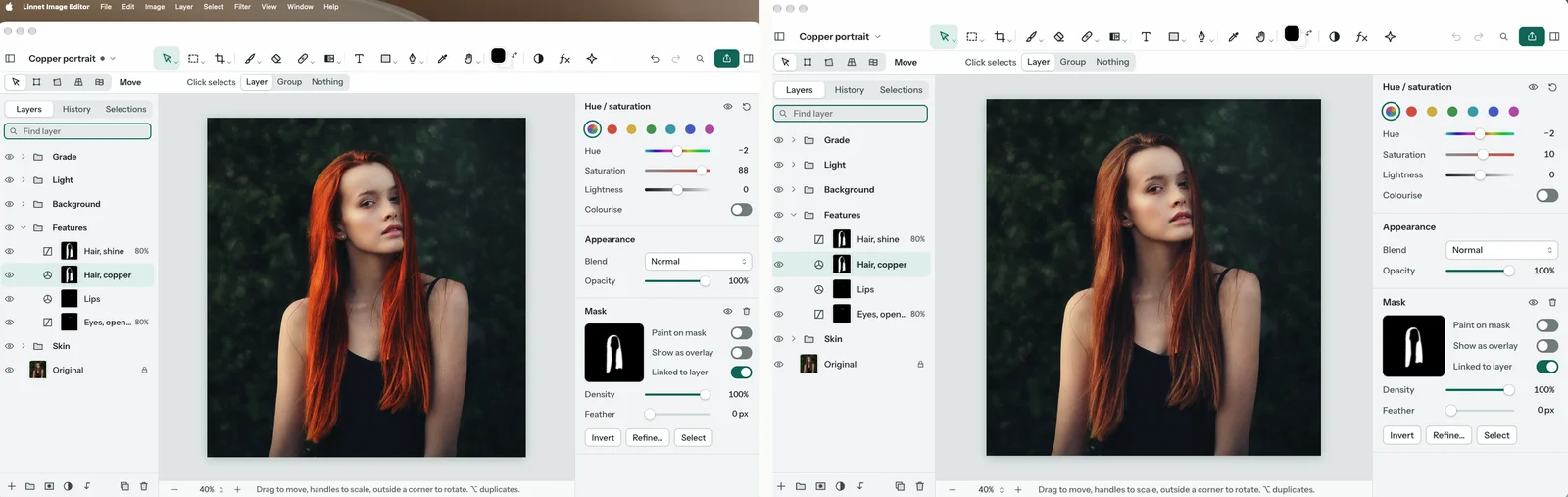
It is not without its flaws. Choose Open from the menu bar at the top of the screen and nothing opens; instead a small bar appears inside the app, “Ready to open a file”, with a button to choose one. A small friction, but a telling one. Photoshop has been refined over decades by seasoned engineers and designers, and this is the problem people have raised about vibe coding: you can build something effective very quickly, but complex software has so many ways of doing things that building and refining your own version could take longer than using the established tool. Then there are the updates and new features, which somebody has to keep shipping.
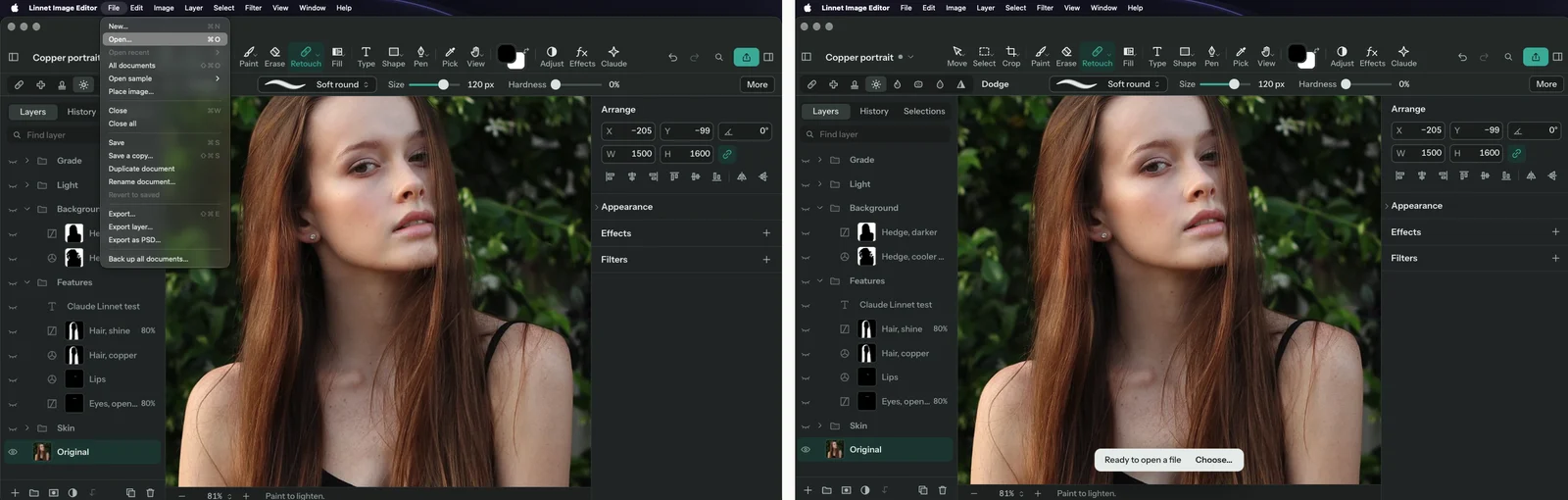
This is where it gets interesting for comms teams and organisations. If one engineer can describe an image editor, a team can describe the approvals tracker, the stakeholder map or the project board it currently rents by the seat, shaped to how it actually works. I can see that being transformative, but I can also picture the IT director’s face (though Anthropic has thought of that: Team and Enterprise admins can turn app permissions and full access on or off for their whole organisation).
The small print
The launch note is unusually candid, and the details matter more for a team than for me. Installed apps need you online and signed in. Their calls to Claude count against your plan’s usage limits. An app can ask for more of your computer, up to full access to run programs and change files without asking, and Anthropic says plainly that it “doesn’t review apps before you install them”. (Time to develop some policy and guidance quick smart: the Governed Install Checklist and AI Tool Register in the Comms With AI library are a start.) Permissions cover only the current version, so Claude asks again after every update, even your own edits. The feature is on by default for Team plans with full access off, and off for Enterprise until an owner turns it on. Federico Viticci’s closer look at the apps for MacStories shows what sits underneath: they are “HTML apps, wrapped inside an Electron shim”, and “every action they perform is actually handled by the Claude app behind the scenes”, including any access you have already given Claude. An app someone else shares with you also stops working if they stop sharing it, which is worth knowing before a team builds on one.
My own month found two more catches. Moving four databases in about a week meant the instructions Claude works from went stale, much like a team after a reorganisation: we had to work out where everything now lived and make sure nothing was duplicated or left behind. And while my folders sit on my Mac, the apps keep their data with Anthropic. So every Friday a scheduled task now copies all four databases into plain files in my folder – 823 records on the first run – which ChatGPT or an open-weights model on my own machine could pick up if I stopped paying for Claude. If you take one governance point from this piece, take that one; the Govern phase of the Comms With AI framework is where the rest of those questions live.
As for money, I have been on Claude’s second top Max plan at £90 a month for most of these builds, and the top plan would have made no difference. How much you might save depends on adding up what you already pay for. For me, set against Notion at about £10 a month, there is no saving; the sums only change for a team paying per seat.
What it can’t do (yet)
Three jobs stayed outside, and they are the reason I trust the rest.
The accounts. QuickBooks stays, because the accountability sits there: the tax return, the accountant and the record HMRC may one day ask to see. Claude’s QuickBooks connector is only available to US customers so far, which has been frustrating, so I still download documents from QuickBooks by hand, although Claude can do some of the work through Chrome.
Tracking what AI engines say about you. This autumn I paid a GEO tracker to ask four AI engines the same 15 buyer questions every day, and wrote up what its dashboard said against what its rows said. At 6.41 am this morning I asked Claude, on its Fable 5.2 model, for an app that checks whether AI assistants name Faur when buyers ask five of those questions. Before it built anything, it flagged the catch: Claude called from inside an app cannot search the web, so the app’s Run button can only test what Claude says from its own knowledge. Claude with web search, ChatGPT, Gemini and Perplexity become answers I paste in by hand, ideally from an incognito chat, because my everyday Claude knows about Faur and would flatter the result. By 6.47 am the app existed: ‘Faur AI Mention Check’, with the five questions stored, a log I can edit, a mention rate by engine and date, a list of who else gets named and a CSV export. It took about as long as it took me to record a voice note about Linnet. By 6.48 am it was an app on my desktop: seven minutes from asking to installed. Its first run, Claude without web search, named Faur on none of the five questions, the same blank I drew when I asked Claude by hand in the autumn.
One morning, timed
Seven minutes from asking to installed
- 6.41 am Asked Claude (Fable 5.2) for an app that checks whether AI assistants name Faur
- Next Before building, Claude flags the catch: an app cannot search the web
- 6.47 am The app exists, with five questions, a log, mention rates and a CSV export
- 6.48 am Installed as an app on the desktop
- By 6.54 am First run: Faur named in 0 of 5 answers
The app will be useful for what I do, and I will run it and report back – but it would not replace an AI visibility tool at the moment, because those run automated searches across the engines and this can’t. I can see that being a short hop, skip and a jump away. The software is easy to describe. Whether an app on my desktop may put questions to other companies’ AI engines every day, and whether my handful of answers is a fair sample, are questions about data and permission.
Anything that sends on my behalf. I could ask Claude for a newsletter tool this afternoon. I won’t. Emailing hundreds of people means proving each one signed up, honouring every unsubscribe and making sure the messages land in inboxes rather than spam, and the law cares about all three. If that goes wrong, I want it to be a specialist provider’s problem to fix, not something I built before breakfast.
The “(yet)” in the headline is meant. The install button arrived while I was writing this, and I have no doubt Anthropic and all other main players will be looking to introduce versions of this which have web search and are as fully featured as possible.
The Practice: what you can put into practice today
- Install one demo app and one of your own. Update Claude for Mac or Windows, open Linnet and choose “Install as app”, then do the same with a small tracker you describe yourself. Twenty minutes will tell you more about where this is going than any SaaSpocalypse forecast. (No permission to install apps at work? Try it on a personal device and account, with nothing confidential in it.)
- Sort your subscriptions into three piles. For each tool your team pays for, ask what the money buys: the software (a calendar, a tracker, a dashboard), the data (a journalist database, a panel, a feed you could not collect yourself) or the accountability (sending, consent, the books, uptime someone else answers for). Only the first pile is worth trying to rebuild.
- Settle the permissions and the exit plan before anyone relies on one. Agree with IT how much of the computer an installed app may touch, name who maintains each tool, and set up a scheduled export of its data to plain files. Mine took an hour.
Try it
What are you paying for?
Each kind of tool your team might pay for, and what the money mostly buys.
Which tool would your team describe into existence first?
If you are starting with Claude yourself, the Claude for comms working guide covers the set-up, the limits and what to try first.
24 claims checked against their sources.
More like this
experimentCreate
How good is Claude at building an AI tool for LinkedIn content creation?The July 2025 piece where I first built a working tool in Claude.
articleTransform
How we build: app development ground rulesThe rules I set in July 2025, worth rereading now the apps install.
experimentMonitor
The dashboard said we were winning: I paid a GEO/AEO tool to track my firm's AI visibility for a monthThe month of paid AI visibility tracking behind the job Claude can't take over yet.