Checked on 25 November 2026 against the help pages of ChatGPT, Claude, Gemini and Microsoft 365 Copilot. Features and plan limits change often, so the table in chapter 2 is dated and re-checked every three months. A maintained pack makes output more accurate; someone still checks every fact against the original source before anything goes out.
To give AI your organisation’s knowledge, build a small pack it reads every time and keep it current.
- Choose one task you are tired of re-explaining.
- Write one page of standing instructions for it: who you are, approved language, house style, what never goes in, and when to stop and ask.
- Put the instructions and one approved reference in a project or notebook in the assistant your organisation has approved.
- Test it against a blank chat, and fix what it gets wrong.
- Name one owner and give them thirty minutes a fortnight to keep it accurate.
1. The essentials
Most generic AI output comes down to missing context. The assistant has no idea what your organisation has already said, approved or decided, so it fills the gap with the average of everything it has read. The fix needs no technical skill, just the editorial judgement comms people already have: a maintained set of instructions, facts and decisions the assistant reads at the start of every task, and someone who updates it as decisions land.
What “memory” means here. Three things get called memory, and this guide is about the first:
| What it is | Who writes it | Good for | |
|---|---|---|---|
| A maintained pack | Standing instructions plus a few approved reference files, kept in a project, notebook or folder | Your team, on purpose | Approved language, positions, house style, who signs off what |
| Automatic memory | A summary the assistant builds from your past chats | The assistant | Convenience: your preferences, recent work |
| Connected sources | The assistant searching SharePoint, Drive or another system | Nobody; it reads what is there | Finding documents at organisational scale |
Attaching a document once is none of these. You still need a way to supply that context every time, check it was used and approve changes to it.
What you need first: an assistant your organisation has approved for internal material, one task you are tired of re-explaining, and one current, approved reference for it.
Working estimate: a first pack takes an afternoon; keeping it accurate takes about thirty minutes a fortnight.
2. Where it can live
Start in a project or notebook inside the assistant you already use; move to the organisation’s own systems only when files stop scaling. The first three places hold a pack you maintain, in rough order of effort. The fourth writes itself. They are not exclusive, and most teams end up running two.
1. A project or notebook in the chat tool. Standing instructions plus attached files, scoped to one piece of work. Nothing to install, and you can test the idea properly in an afternoon. If you are starting this week, start here.
2. A folder of plain files on your own device. One markdown file per subject, read by a desktop assistant at the start of a session and updated at the end. The text is yours, it moves between tools, and you can see what changed and when. It needs an assistant allowed to read and write local files, which is a bigger step than most teams have taken, and it is out of reach when you are away from that machine.
3. The systems the organisation already runs. Agents grounded on a SharePoint site or library, Copilot Notebooks, or ChatGPT’s company knowledge. This is where a whole team’s knowledge eventually belongs, and it raises the stakes: the assistant inherits the permissions of the library behind it, so anything that library was quietly over-sharing gets surfaced quickly, to everyone, by a chatbot. Run the permissions check before you connect anything.
4. The memory that builds itself. Every major assistant now keeps a summary of your past chats. Useful as a convenience; it is written by the model, you rarely read it, and you cannot hand it to a new starter on their first morning. Treat it as a supplement to the pack, never the pack.
By assistant (checked 25 November 2026)
| Project or notebook | Shared with colleagues | Organisation sources | Automatic memory | |
|---|---|---|---|---|
| ChatGPT | Projects, on free and paid plans, with an option for project-only memory | Yes, on all plans | Company knowledge on Business, Enterprise and Edu | Saved memories and chat history, switchable |
| Claude | Projects, each with its own separate memory | Team and Enterprise | Connectors to Drive, SharePoint and others | On by default on Free, Pro and Max; owners decide on Team and Enterprise |
| Gemini | Notebooks in Gemini, synced with Gemini Notebook, free and paid since April 2026 | In Gemini Notebook, as viewer or editor; shared notebooks don’t appear in the Gemini app, and on Workspace an administrator decides whether sharing can go outside the organisation | Workspace apps and Gemini Enterprise data sources | Memory of past chats, not used inside Gems |
| Microsoft 365 Copilot | Copilot Notebooks, in Copilot Chat as well as the full licence | With a Microsoft 365 Group | SharePoint agents, and Notebooks grounded on sites and folders | Memory where your tenant has switched it on |
Plan names and limits change often. Check your own plan’s help page before you build, and check with IT which of these your organisation has approved.
The Briefing says when this guide changes. It lands every week: what’s changed in AI, what it means for your work, and one thing to try.
3. Set up a first pack in an afternoon
One task, one page of instructions, one approved reference. Resist building a library of everything your team knows; build the smallest pack that changes one piece of work, then test whether it did.
- Choose one task you are tired of re-explaining: a familiar media enquiry, a stakeholder update, the boilerplate paragraph. Ten minutes.
- Gather what an experienced colleague would need for it: the current approved wording, the position on the two or three questions that always come up, who signs off, and what must never be said. Use only material authorised for the tool you are using. Forty-five minutes.
- Run the prompt below in a normal chat to turn that material into a first set of standing instructions. Fifteen minutes.
- Open a project or notebook, paste the corrected instructions into its instructions field and attach the one approved reference, with its source, approval date and owner written at the top. Fifteen minutes.
- Test it: give the same task to a blank chat and to the project, then compare factual accuracy, use of approved language and how much editing each needs. It is a first signal, not proof. Thirty minutes.
The prompt: turn your material into standing instructions
Prompt Tested in Claude, ChatGPT, Gemini and Copilot, 25 November 2026
Check the approved language section yourself. In our test, Claude, ChatGPT and Copilot kept the approved lines word for word and flagged a contradiction we had planted. Gemini also filed a 20-month-old figure from an old media pack under approved language, while flagging the same figure as out of date, and told the project to use it. Whichever assistant you use, nothing goes into that section unless someone has approved it.
For a draft you would put in front of an approver, add the house rules to the end of the prompt.
4. Ten habits that keep it trustworthy
An unmaintained pack is worse than none, because people carry on trusting it. The first three habits are worth keeping whatever your set-up; the rest matter as use grows.
Start here
- Write instructions before you build a library. One page of “how we do things here” does most of the work: assistants follow standing instructions more reliably than they retrieve from attached files. Then add only the references a task needs.
- Keep the durable apart from the dated. One file for how we work, stable for months; another for what is live now, changing weekly. Mixing them is how an assistant quotes last quarter’s position to this quarter’s journalist.
- Turn a correction you want repeated into a line in the pack, the same day. Only the ones you want repeated: one-off preferences pile up into contradictory rules.
As you use it regularly
- Decide what never goes in, and where the pack lives. A pack is a disclosure surface. Embargoed news, personal data, live legal advice and unannounced changes stay out; put that line at the top of every file. That line is only a reminder; the real protection is working in a tool your organisation has approved for the material. Using AI safely sets out the rules, and chats and files can be disclosable in litigation.
- Name one owner and book the maintenance. Thirty minutes a fortnight, one person, and a “last amended” line at the foot of each file. The easy way to run it: ask the assistant what in the pack looks out of date, then accept or reject each suggestion.
- Give each brand, client or product its own pack. Separate projects keep each context sharp and keep confidential work where it belongs.
- Record where approved language came from. For each position or phrase: the source, who approved it, when it took effect, when it is due for review, and whether it is proposed, approved or superseded. Approval beats recency: a fresh draft never outranks an older approved position, and superseded wording is marked, not deleted.
For heavy use and whole teams
- Record what you rejected, and why. “We considered this in March and did not do it, because.” It stops the team relitigating settled arguments, and it stops the assistant proposing the thing legal turned down six months ago.
- Run a cold-brief test once a month. Give the assistant a real task using only the pack, and judge the output against what a competent new starter would produce. A failure is a diagnosis: missing context, a file it did not use, an unclear instruction or a limit of the model, and each has a different fix.
- Move from files to connected sources only when files stop scaling, and run the permissions check on the library first, not after the first awkward answer.
5. Tested in practice
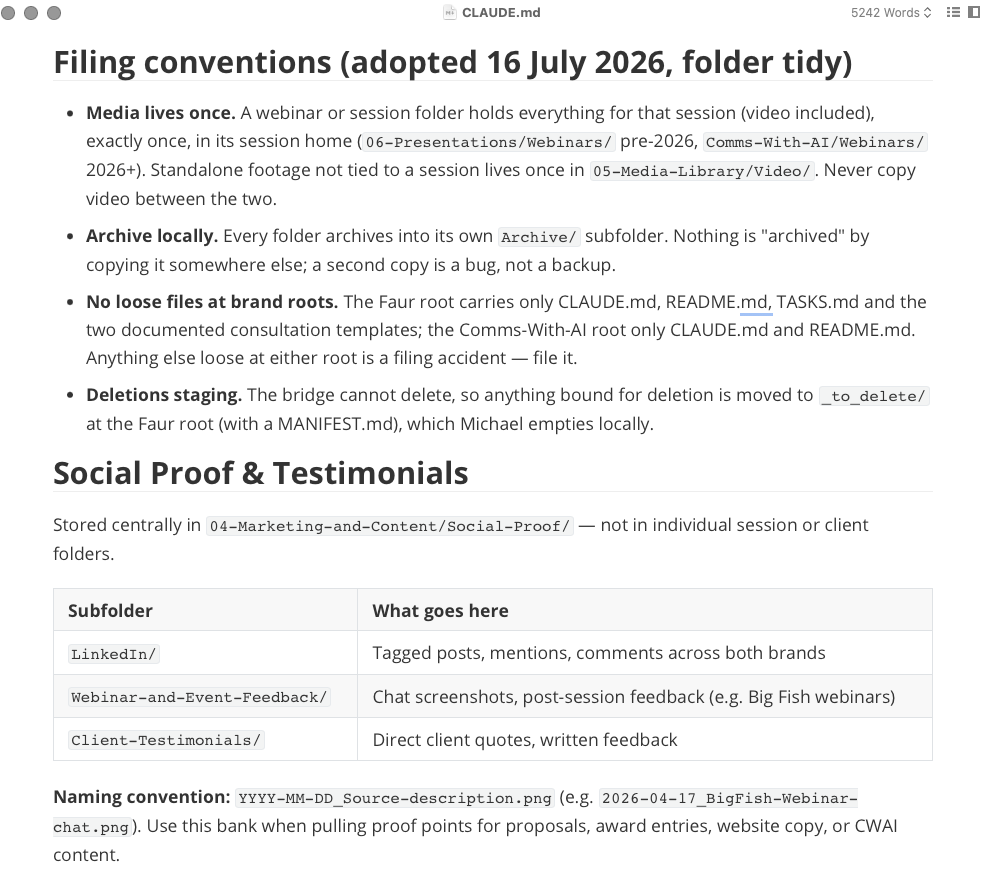
How I run mine. Across Faur and Comms With AI I keep a set of operating notes: plain markdown files, one per part of the business, holding the current position, the conventions and the decisions with the reasoning behind them. Claude reads the relevant ones at the start of a session and updates them as decisions land. The practical effect is that I stopped re-explaining my business every morning.
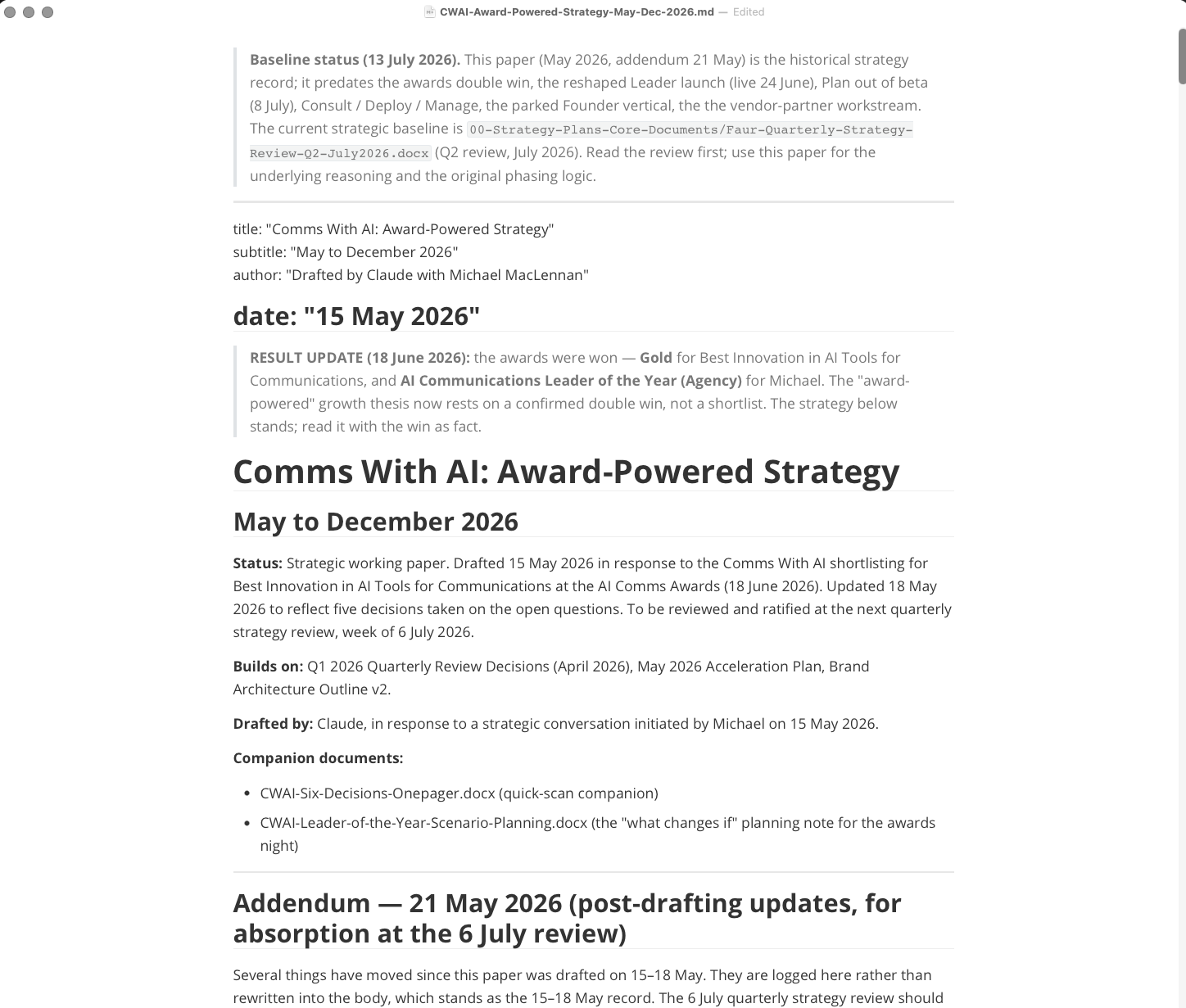
The example that matters most is approved language. For one client, a large infrastructure programme, the strapline, the short description and a set of key facts all had to be exactly right, because stakeholder approval depended on them. They live in a playbook, and the standing instructions send the assistant there whenever it writes anything for that client. A scheduled check then reads recent output for slips in the approved wording and tone. Keeping the language available is the start; checking it is used is part of the maintenance.
The limits are real. The files need gardening: they grow long and two notes drift out of agreement unless something reconciles them. The model’s own writing habits creep in unless you police them, which is why my notes carry a standing line on em dashes that still gets tested weekly. And a remembered claim is not a verified one.
6. What stays with the human
The assistant reads the pack; people decide what goes in it.
| Check | What a person confirms |
|---|---|
| Approval | Every position and phrase in the pack was approved by the person named against it |
| Currency | Nothing superseded is still marked approved; the “last amended” line is under a month old |
| Exclusions | Nothing on the never-list has gone in, and the tool is approved for what is there |
| Access | Everyone who can open the project or library should be able to see everything in it |
| Output | Facts in anything that goes out are checked against the original source |
Read more: Casey Newton’s account of living with an AI-maintained wiki, on Platformer, and each assistant’s help page, linked in the table in chapter 2.
Want to talk this through?
If your team wants its foundations written and set up properly, Deploy writes them with you, where most teams invest £1,500 to £7,500, and Consult is a 45-minute working session with a written note, at £300. Every engagement is delivered directly by Michael MacLennan, AI Communications Leader of the Year 2026.
Next steps
Put it to work
- Free AI Use Policy The living policy template: what your team may use, for what, and what never goes in. Use the template
- Free Position Register The record of what your organisation has said and will stand behind, ready to sit in your pack. Build your register
- Guide Claude for comms Setting up a Claude Project for a comms team, with the prompt that writes its instructions. Read the guide
- For teams Help for your team Consult, Deploy, Training and Manage: the ways Comms With AI works with in-house comms teams. See the options