Lunch, learn, launch: the workflow
Thanks for joining the live session, or for catching up via this page. Everything we built and discussed is here: the full five-step workflow, all the prompts you can paste straight into Claude, the things that came up live, and where to go next if you'd like to keep learning.
Built live inside the hour. Yours to run tomorrow.
The recording
Watch the session back
Hosted by Big Fish Training. Sixty minutes, with Emma Ewing and Michael MacLennan.
What happened on 5 June
A live build, with the audience steering
Sixty-odd people joined from across the UK, Stockholm and the US east coast for the lunchtime build. Emma Ewing at Big Fish Training set the scene; Michael picked up the screen-share and ran a Claude Project from blank canvas to a full campaign pack inside the hour.
The audience steered, in three places:
- →The brief. A poll ran A, B or C. The B2B SaaS launch (compliance analytics for mid-market finance teams) won 49 to 45, with the charity volunteer drive close behind and the law firm repositioning trailing. People also fed in their own curveballs in the chat.
- →The product name. Audience suggestions ranged from Optimus Prime to Fung AI. The room landed on Flumpt, with the appropriate level of branding panic about whether SaaS naming conventions have any rules at all.
- →The tone of voice. Claude suggested Xero, Stripe, Monzo, Companies House and Wise as reference brands. The room voted, and Stripe won, "plain-spoken, account-first, finance literate without being condescending".
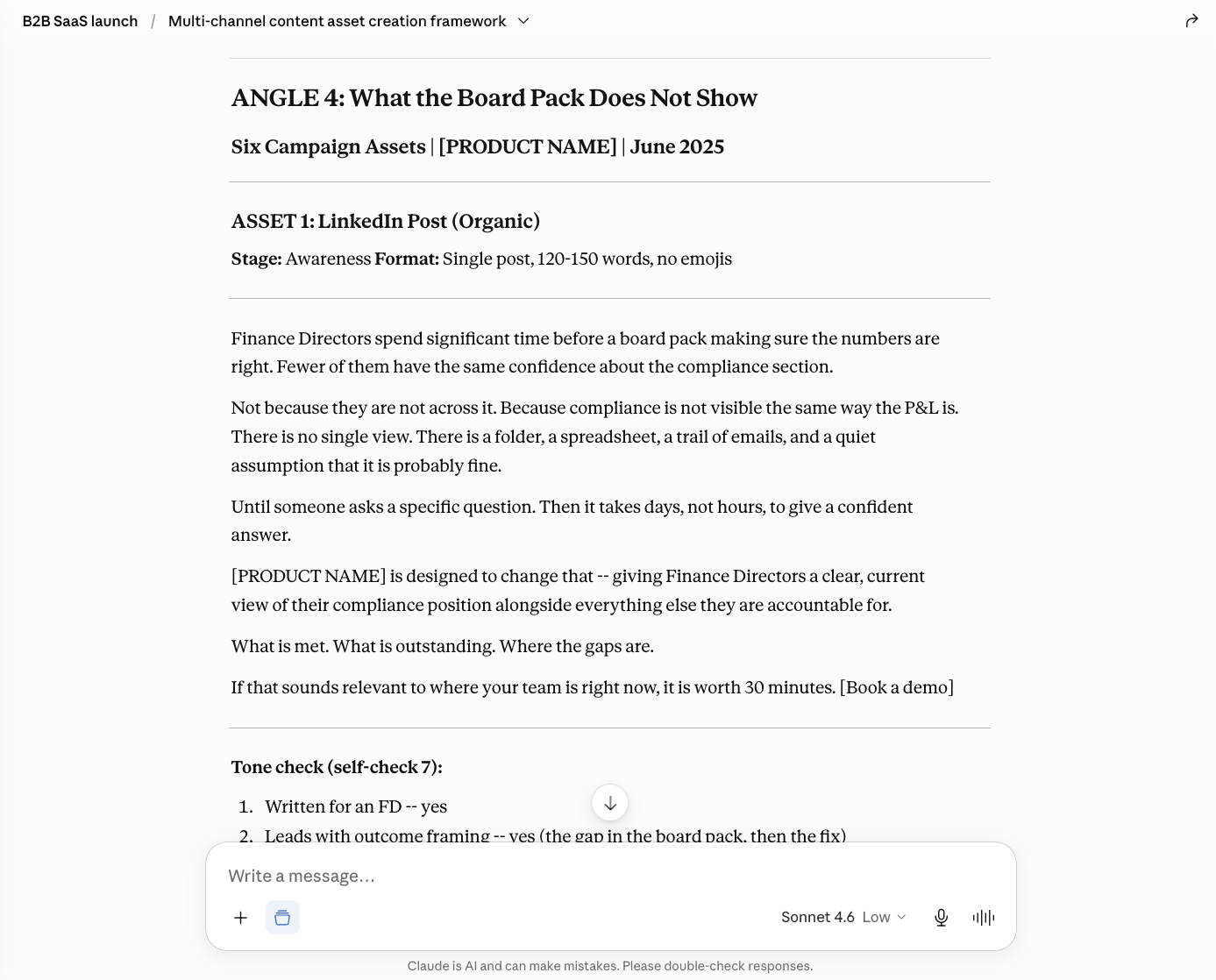
- →The content angle. From the eight angles Claude generated, the room picked Angle 4: "What the board pack does not show", the line that finance directors spend hours making sure the numbers are right but often have less confidence about the compliance section.
From there, Claude drafted a LinkedIn post, a five-slide carousel, a prospect email, a press release, an internal Slack post, and a sixth asset (a Q&A piece) that Claude added itself when given the room to "do something with flair". The governance pass then critiqued its own drafts and produced a 10-point pre-publish checklist. The recap slide came last, generated by Claude with all the context the Project had picked up along the way.
What this is
A page you can keep coming back to. Everything you need to replicate the workflow is here: the methodology, all five prompts, the setup, and the principles that make it work.
Most AI in communications produces one-off outputs. You ask for something, you get something, then you start from scratch the next time. This workflow is different. It builds a persistent workspace that gets more valuable with each use. Projects act as containers. Skills encode your quality standards. Each artefact becomes reference material for the next.
The 30 / 70 principle
AI does the execution. You bring the judgement.
AI handles roughly 30 percent of the work: structure, first drafts, executing defined patterns. The other 70 percent is yours: strategic judgement, editorial control, and the decisions about what is credible versus what is overreach. Treat AI as a capable junior strategist who follows instructions well but needs supervision. The governance pass in Step 6 exists because AI will produce plausible nonsense if you do not check its work.
The workflow
Five steps. One persistent layer.
Persistent layer: Claude Project + Custom Skill (tone of voice)
Remove any one of those layers and quality drops. The Project holds context across every conversation. The Skill encodes tone once and applies it forever. The prompts are the execution layer.
Before you start
You'll need
- → A Claude paid plan (Projects are not on the free tier)
- → A campaign brief, 150 to 300 words is ideal
- → 35 to 45 minutes of uninterrupted time for your first run
- → A basic sense of what makes good comms strategy
You won't need
- → Deep AI expertise
- → Prompt engineering experience
- → Technical skills beyond copy-paste
- → A complete brief, the first step actively surfaces what is missing
Models, in plain English
Claude has three current models: Haiku (fast and cheap), Sonnet (the balanced default), and Opus (deeper, slower, just relaunched in version 4.6). Run the workflow on Sonnet. If a step runs slow, switch to Haiku for that step. Reach for Opus if a step needs more strategic depth and you can spare the time.
The prompts
The five prompts, in order
Copy and paste them straight into Claude. Each step builds on what came before, and references back to it. The Project is what makes that reference work.
Create the campaign Project and generate Instructions
What it does: creates a new Project as the campaign workspace, then asks Claude to produce both a cleaned brief and Project Instructions in a single pass. This forces assumptions into the open before any tactics are drafted.
Why it matters: most briefs are incomplete. Clients assume you know their sector, their constraints, their success metrics. This surfaces all of it before you start building.
Prompt
Based on this brief, generate comprehensive Project Instructions for this
campaign workspace that will also function as a cleaned brief summary. Include:
1. CAMPAIGN BRIEF SUMMARY (1 paragraph with reasonable assumptions)
2. KEY ASSUMPTIONS MADE (what you've assumed vs what was provided)
3. DEFINITION OF DONE (what does 'finished' look like?)
4. PROJECT INSTRUCTIONS:
   - Strategic context
   - Rules for assumptions (use [BRACKETS] where the user can clarify detail)
   - UK English throughout
   - Reference back to the Foundational Comms Structure once it exists
   - Maintain tone consistency with any tone rules provided
   - Flag risks and unsupported claims proactively
   - Be decisive, do not ask clarifying questions
Make it thorough but concise.
The Definition of Done tends to fall into four natural layers: strategy, content, activation, commercial outcome. Watch for those in the output, and correct any that look thin.
Build the Foundational Comms Structure
The strategic spine. Every later decision checks back against this. Teams that skip the spine and jump straight to tactics end up with scattered campaigns. Save the output as a file in Project Knowledge: it becomes the bank of knowledge the rest of the workflow references.
Prompt
Create a Foundational Comms Structure in exactly this format:
OBJECTIVE:
PRIMARY AUDIENCE:
SECONDARY AUDIENCE:
AUDIENCE INSIGHT: (Why would they care?)
KEY MESSAGE: (If you had one sentence, what would you say?)
SUPPORTING POINTS: (Three reasons why, with proof or credibility.)
CALL TO ACTION:
ELEVATOR PITCH: (30 seconds, conversational)
TONE RULES: (How should this sound?)
RISKS TO AVOID:
RULES:
- Use [BRACKETS] when human input is needed
- Be specific, no generic strategy-speak
- No em-dashes
Output this as a document I can add to the Project's Knowledge.
Turn tone of voice into a reusable Skill
Skills are reusable instructions that apply automatically across every conversation in the Project. Anchoring tone to a recognisable brand voice makes the rule concrete and testable. Claude even has a Skill for building Skills.
Run it as two passes. First, ask for five voice options (in the live session, the room added their own suggestions in chat alongside Claude's five). Then once you have a winner, generate the Skill itself.
Prompt A: voice references
Based on the tone rules in the Foundational Comms Structure, suggest 5 real
companies whose brand voice matches what we're aiming for. Recognisable names.
Format:
1. [Company name]: [one sentence on why their voice fits]
Prompt B: build the Skill
Now create a reusable Claude Skill for this Project, based on the winning voice.
Name the Skill: "[Voice name] tone of voice". Once added to the Project, it should
apply automatically to every text generation. Include:
- VOICE PRINCIPLES (3 to 5, concrete, not generic)
- GUARDRAILS (what to avoid)
- FORMATTING RULES (UK English, sentence case, active voice, no em-dashes)
- SAMPLE SENTENCE in this voice addressing our primary audience
Base it on the tone rules in the Foundational Comms Structure and the brand voice
of [chosen company]. Output as a ready-to-paste Skill description for the Skill builder.
Paste the output into the Skill builder in the right-hand panel of your Project, and save. From that point every draft inherits the voice automatically.
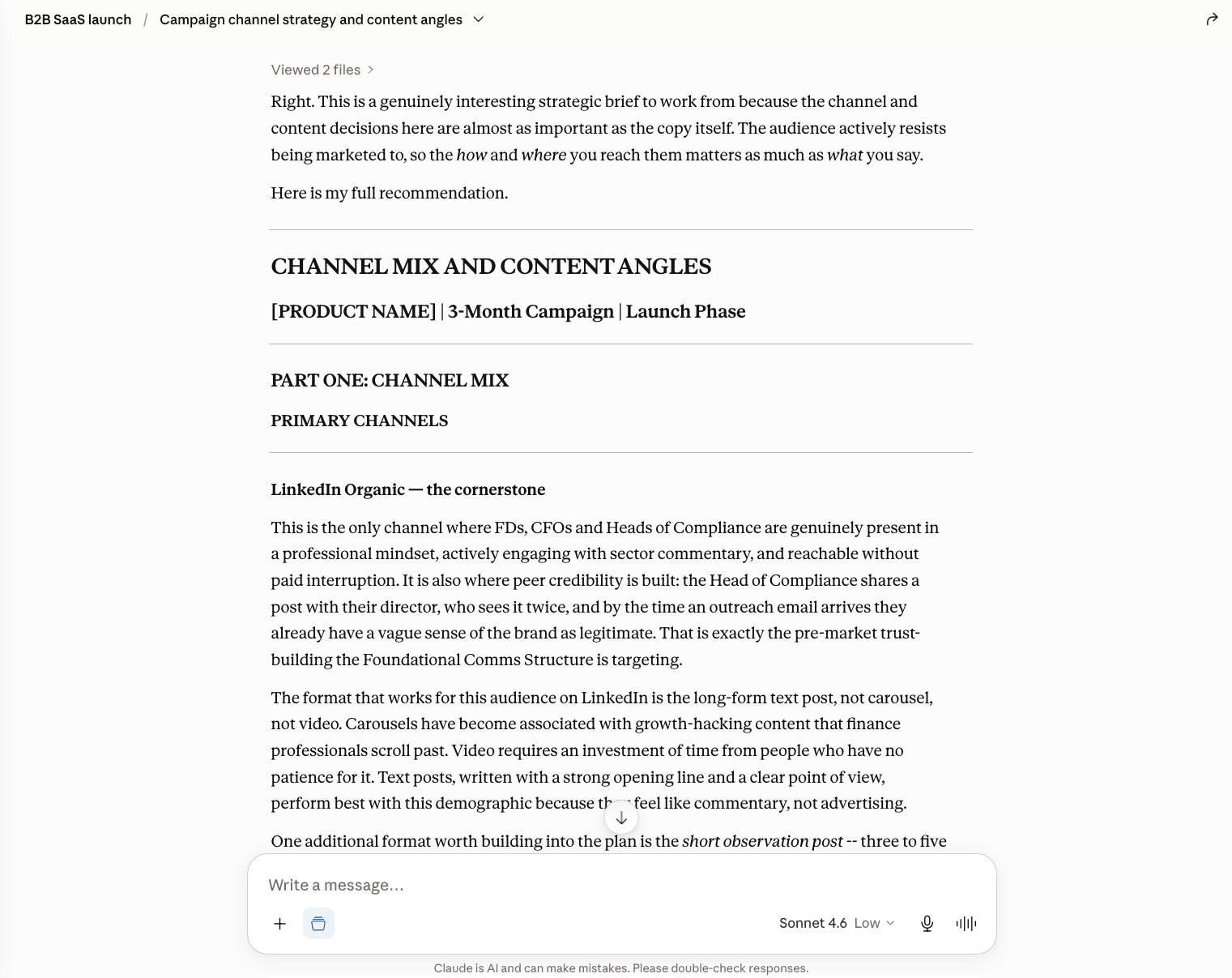
Channel plan and eight content angles
Most teams jump to "let's do a LinkedIn post" without asking why LinkedIn for this audience. This prompt forces channel choice to be strategic. Eight angles, rather than one or two, because AI is good at range, and gives you genuine options to pick, merge or discard.
Prompt
Using the Foundational Comms Structure, recommend:
1. CHANNEL MIX (primary + secondary channels)
   - Why each channel for this audience
   - Best content format per channel
   - Realistic cadence
2. EIGHT CONTENT ANGLES / HOOKS
   For each: hook line, why it works for this audience, best channel,
   and how it connects to the key message.
Assume a 3-month campaign timeline. Every angle should ladder back to the
key message in the Foundational Comms Structure.
Draft six assets in a single pass
One run produces a consistent set of assets in one voice. Pick an angle, paste the prompt, and let the Project's context plus the tone Skill do their work. AI gets a bad name for slop, usually because inputs were vague. We have defined things precisely.
Prompt
Use content angle [X] to draft the following assets, checking each against
the Foundational Comms Structure, channel plan and tone of voice:
1. LinkedIn post (120-150 words)
2. LinkedIn carousel copy (5 slides, punchy)
3. Email to prospects (200-250 words)
4. Press release (350 words)
5. Internal Slack team post (informal, motivating)
6. [Leave open: let Claude choose an appropriate final asset with some flair]
For each asset:
- Match it to the recommended channel and format
- Apply the tone rules from the Foundational Structure
- Include [BRACKETS] for anything needing confirmation
- Flag any claims that need evidence
If the assets come back with too many placeholders, run this follow-up:
Redraft all six assets with these changes:
- Make reasonable assumptions rather than using [BRACKETS]
- Be decisive about specifics (dates, numbers, examples) from the brief and context
- For asset 6, make it more creative, something that would stand out
- Keep everything aligned to the Foundational Structure and tone rules
Governance pass
AI critiquing its own work is a real governance layer. Two layers, in fact: strategic alignment (does it still serve the Structure?) and tone consistency (does it still sound like the Skill?). The pre-publish checklist saved at the end becomes reusable across every campaign you run in this Project.
Prompt
You're now the risk and quality checker. Review all the assets you just
drafted against the Foundational Comms Structure and tone rules. Identify:
1. CLAIMS THAT NEED EVIDENCE
2. TONE MISMATCHES
3. ANYTHING THAT COULD MISLEAD OR CREATE REPUTATIONAL RISK
4. LINES TOO VAGUE OR GENERIC TO BE USEFUL
For each issue: severity (high / medium / low), quote the problem line,
explain why it's an issue, and provide a revised version.
Then:
- Rewrite the three riskiest lines
- Create a 10-POINT PRE-PUBLISH CHECKLIST reusable for every campaign
In real work, run a second opinion through ChatGPT or Gemini as well. Different models catch different issues. You always remain the editor.
Recap, live
The bookend. We opened with Claude generating a deck. We close with Claude generating one more, and the Project's accumulated context makes this second pass noticeably richer. It is a small move that lands the compounding-value point hard.
Prompt
Create a 1-slide recap of what we just built, in presentation format.
TITLE: "What We Built Live"
Sections:
- Project workspace created
- Foundational structure established
- 5-step workflow followed
- Custom Skill created (tone of voice)
- Key deliverables drafted for refinement
- Pre-publish checklist saved
- What this team can do tomorrow
Keep it visual and concise.
Things that came up live
Tips and tangents worth keeping
A handful of moves and asides from the live session that didn't make the prompts but are worth remembering.
Voice prompts in Claude
Inside Claude, press and hold the microphone icon to record a voice prompt. Useful when you want to refine an output verbally rather than typing, especially mid-flow ("this company is in Aberdeen, can we make it renewable-sector specific?"). It feels much closer to briefing a colleague than typing into a chat box.
Two tools, one job: critique across models
For higher-stakes work, run the same draft through Claude and ChatGPT (or Gemini) and ask each to critique the other. The models are surprisingly self-effacing, and the comparison surfaces issues a single tool tends to miss. You remain the editor, weighing both views.
Banned-word lists
Add a banned-word list to your Foundational Structure or your tone Skill. "Quietly", "genuinely", em-dashes and double hyphens are common AI tells. They sneak back in even when you tell the model not to use them, which is why pulling them out in the governance pass matters.
Files into Project Knowledge
Anything useful as reference material can go into the Project's Knowledge files: a previous strategy, the brand guidelines, examples of past LinkedIn posts that landed well, the way your team approaches each channel. AI is not doing the work for you; you are showing it how you work. The richer the input, the stronger the output.
The Skill builder can be flaky
On a bad day, the Skill builder will not behave. The tone rules are already in the Foundational Comms Structure, so outputs in that conversation still hold. Continue without the Skill, then come back to it once the builder is stable. You lose the automatic application; you do not lose the rule.
Where this fits
The Comms With AI five-phase workflow
Today's build walked the first three phases. Monitor and Transform come once a campaign is live and you have data to act on.
The full library, 69 templates and 9 toolkits covering all five phases, is free at commswith.ai.
Variations
Once the workflow is muscle memory
Four moves that sit alongside the core five steps. Useful once you've run it a few times and want to push it further.
Audience avatars as custom GPTs
Build a custom GPT (or Claude Project) for each ideal customer profile in your campaign. Give it the demographic and psychographic detail from the Foundational Structure. Then route draft assets through it for an audience-reaction test before they go anywhere near sign-off. It will not replace real audience research, but it is a fast first read.
The difficult-stakeholder simulator
Same idea, applied to a specific person you work with whose responses you'd like to anticipate. A short brief, ideally with verbatim quotes if you have them, gives you a stand-in to run drafts past. Surprisingly useful before sending into a tricky inbox. Obvious caveat: do not share that GPT with the actual stakeholder.
Multi-tool quality checking
Run the final pack through a second model with a single instruction: "review this for claims that need evidence, tone inconsistencies, or logical gaps." Different models flag different issues. Which tool is better is not the point. A second pair of eyes costs you a minute.
Modular packs
Run Steps 1 to 3 once. Then run Step 4 several times with different channel focuses: a social-only pack, an earned-media pack, an internal-comms pack. The Project's context makes each pack consistent with the others; you do not start over.
Common problems, and fixes
Six issues that come up on first run-throughs, and what to do about each.
The Foundational Structure is too generic. It could work for any campaign.
Return to Step 1 and force more specificity in the brief. If the brief says 'tech companies', ask 'which segment of tech?'. If it says 'decision-makers', ask 'which function?'. Vague briefs produce generic structures.
AI keeps generating content that ignores the Foundational Structure.
Your Foundational Structure is not directive enough. Instead of 'sound professional', write 'use you-language, lead with pain points, avoid jargon'. Instead of 'be credible', write 'every claim must link to a proof point in this document'. AI follows instructions literally. Vague instructions produce vague outputs.
The governance pass found 15 problems and now I don't trust anything.
Normal for a first run. AI generates structurally sound content with strategically weak details. The governance pass is working as designed: it is surfacing issues before they become published mistakes. Fix the flags, run the pass again, repeat until you are down to two or three minor issues.
This took 50 minutes, not 35.
First-time setup always takes longer. The second campaign in the same Project is faster: reused Project Instructions, an existing Skill, a known set of prompts. Target 35 minutes by your third campaign.
The Skill builder is glitching today.
Known issue with newer features. The tone rules are already in your Foundational Structure, so outputs still hold; you just lose the automatic application. Continue without it and come back to the Skill when the builder is stable.
My client won't accept AI-generated content.
You have used a structured strategic framework to develop the campaign. The Foundational Structure is strategy work. The Channel Plan is strategic thinking. The governance pass is quality control. AI accelerated drafting; the thinking is yours. That is what to describe.
An audience curveball, taken offline
A 20-second video ad, attempted
Mid-session, an attendee asked whether the workflow could produce a 20-second TV or YouTube advert, or an audio podcast spot. Claude itself is text-focused: it doesn't directly generate video or audio, so we couldn't take that one live. But the question deserved a real go. After the session, I asked Claude (still inside the campaign Project, so still inheriting the brief, structure and tone) to write a detailed video prompt, then took that prompt to Kling, a free video-generation tool, to see what came out.
Honest verdict: an interesting starter, but not actually very good. Six seconds rather than the twenty asked for, and it feels curtailed even at that length. On a paid plan you'd have the runway to iterate the prompt, extend the duration and end up with something usable. On the free tier, this is what the first attempt looks like. Sharing it to show both what's initially possible and how far there still is to go before a free-tier video would stand up alongside the rest of the campaign pack.
Runway and Google Veo were also on the shortlist for this experiment, but both are paid only, so for this first pass I stuck with what was available for free.
Another piece from the same Project
"Compliance Scramble": a playable extension
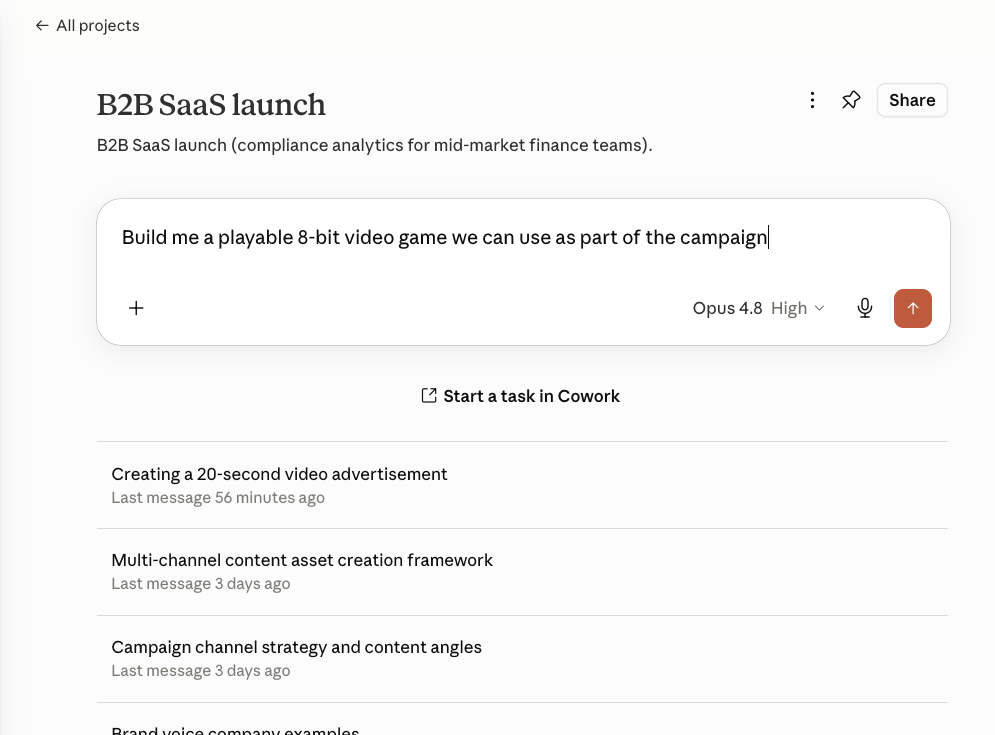
About fifteen minutes, between other tasks. I asked Claude (still inside the campaign Project, still inheriting brief, structure and tone) whether a game could earn its place in a B2B finance campaign without reading as a gimmick. Its answer was yes, but only if the game dramatised the exact feeling Angle 4 was built on: the pre-audit scramble, the board pack with gaps, the quarter that always comes down to the wire. So it built one.
You play a finance person racing to file the board pack before the audit lands, picking up scattered evidence while dodging the usual interruptions. Each hit costs four seconds, which is the whole point. Five quarters to survive, each tighter than the last. The end screen turns the stress into the campaign message and the demo CTA. NES-era palette, pixel font, CRT scanlines, works on touch as well as on a keyboard.
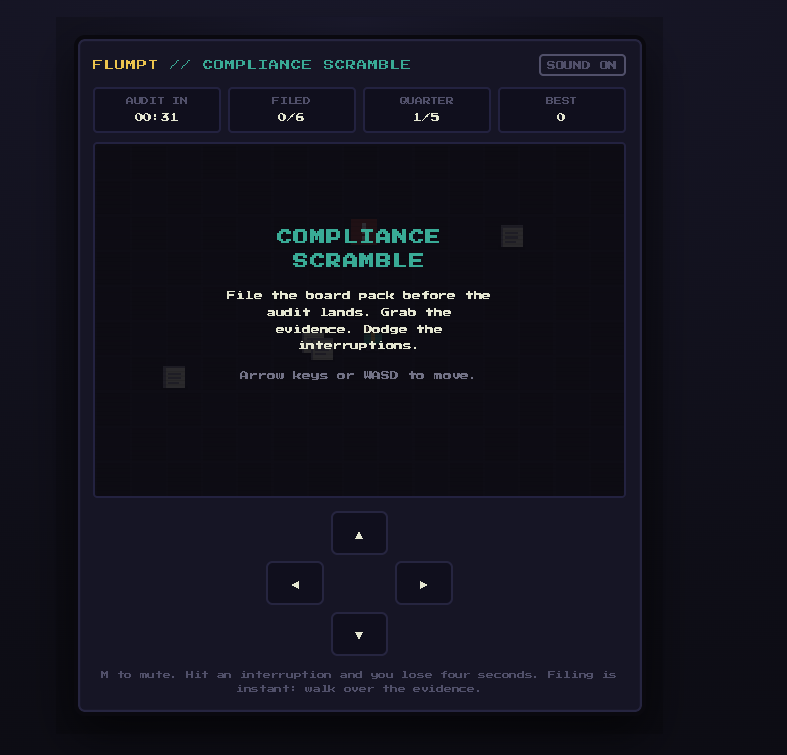
Opens in a new tab. Arrow keys / WASD on desktop, on-screen d-pad on mobile.
Why this works in a finance campaign at all: it's dry and self-aware, not zany. The primary audience for the game isn't the Finance Director; it's the Head of Compliance and the Financial Controller. They're the ones who'd recognise themselves, play it, and forward it to their director with a wry comment. That's the right path for a secondary-audience asset. It sits as a LinkedIn novelty or an email gift, not on the landing page.
Comms With AI Briefing
One email every other Friday. What is happening in comms and AI, and what is new here.
If you found this workflow useful, the fortnightly Briefing is the easiest way to get the next one. Free, no spam, unsubscribe anytime.
Resources and next steps
Where to go from here
Free first. Practitioner sessions next. One-to-one if you want help applying it directly.
1
The free library
69 templates, 9 toolkits, the full five-phase OS. Free.
commswith.ai →
2
Book the July AI courses
AI for Account Executives, Tue 7 July. AI for Account Managers and Directors, Wed 8 July. £249 + VAT. Book direct with Big Fish Training.
bigfishtraining.com →
3
Consult Comms With AI
A working session plus a written advisory note, to apply this to your own work.
commswith.ai/consult →
About
Comms With AI
Comms With AI is a productised library of AI tools and templates for communications professionals. Its publication and learning lab, Applied / Comms With AI, runs experiments and interviews around the same approach. Both are founded by Michael MacLennan.
Comms With AI won Gold for Best Innovation in AI Tools for Communications at the 2026 AI Comms Awards, and Michael was named AI Communications Leader of the Year (18 June 2026).
Page last updated 6 June 2026, the day after the live session. The workflow is free to use, adapt and share. Attribution appreciated, not required.